For Independent Educational Consultants

Show families what a major actually looks like. Before they commit.

A live curriculum tool for IEC meetings. Walk clients and prospects through the real course sequence at any school: required courses, prereq chains, elective paths. Used with families, not sent to them.

Get Your First Flowchart Free See a live example

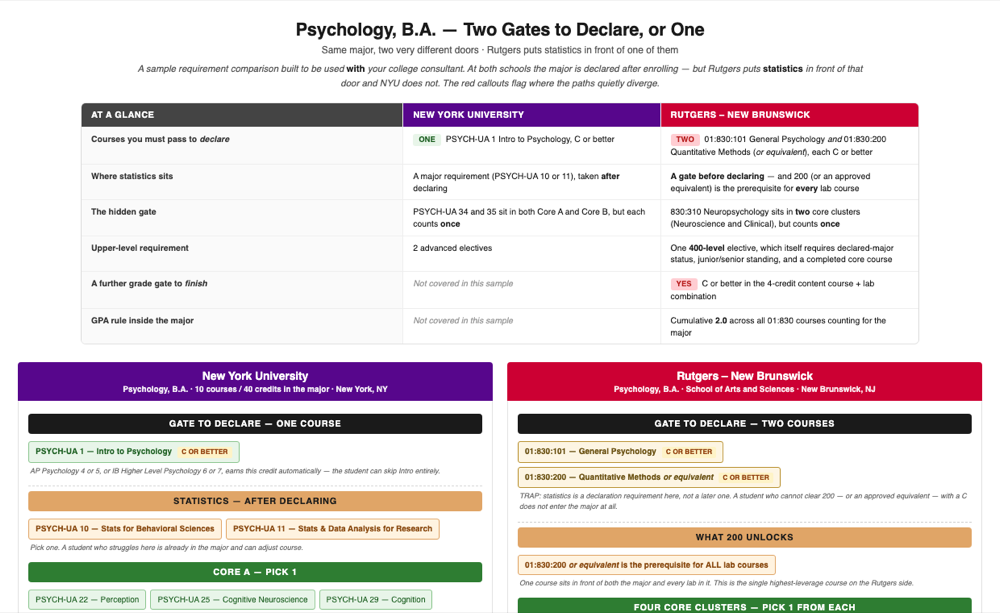
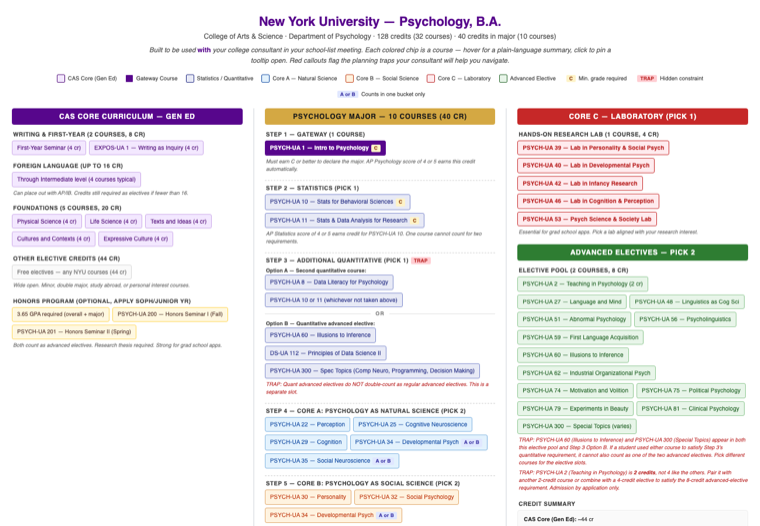
This is what a MapMyMajor flowchart looks like.

Hover any course for a plain-language summary. This is a real flowchart, not a mockup.

NYU — Psychology, B.A. · Source: 2025-26 NYU Bulletins (College of Arts & Science) · Hover any course above for a plain-language summary.

The curriculum data your clients need is locked away.

1

Universities hide it

Degree audit tools like Stellic and DegreeWorks show every prereq chain and course sequence, but only after a student enrolls. Prospective families can't see it.

2

You piece it together manually

Every school-list conversation, you're reading catalog PDFs, cross-referencing prereqs, and building the picture in your head. It works. It doesn't scale.

3

Families can't compare

A parent asks “what does Psychology at NYU actually look like?” There's no visual way to answer that. Until now.

How it works for your team.

Step One

You name the school and major

Email us your client's target schools. “NYU Psychology, Michigan Business, Northeastern Data Science.”

Step Two

We build the flowchart

You get a visual curriculum map with every required course, prereq chain, and elective option. Sourced from the official catalog and verified twice before delivery.

Step Three

You walk the family through it

Pull it up in the meeting. Click courses, read descriptions live, point out the prereq traps as they come up. You're the guide. The flowchart is the map.

The closing asset

The five-minute wow moment in your first family meeting.

The IEC tool families remember from a discovery call isn't the CRM or the calendar. It's whatever showed them what their student would actually study, semester by semester, at the schools they're already comparing. That's the meeting where MapMyMajor earns its keep. Same flowchart works the rest of the year for ongoing client planning, but the close is the job it's built for.

Discovery — the close

Close the family in one meeting.

They've interviewed three firms this week. You're the one who showed up having already mapped the curriculum at the schools they care about. Pull up the flowchart, click through the prereq traps live, answer the question their daughter actually has. That's the signal of depth that converts. Not another bio slide.

Ongoing client work

And every meeting after that.

Once they've signed, the flowchart becomes your shared whiteboard. Compare two majors at the same school, surface the hidden prereq, decide which AP credits actually shorten the path. The family sees your preparation every time you open it.

No tool does this today.

IEC platforms like CollegePlannerPro and CounselMore manage your clients and track applications. College Kickstart tells you safety vs. reach. Naviance gives schools scattergrams.

None of them show a family what their student would actually study, semester by semester, at a target school. That's the gap.

Degree audit tools have this data, but they're locked behind institutional logins, available only after enrollment. MapMyMajor makes that data visible before a family commits.

CollegePlannerPro CounselMore Naviance College Kickstart Stellic (post-enrollment)

Your first flowchart is free.

Tell us one school and major your firm is actively considering with a client. We'll build the flowchart, triple-verify it against the official catalog, and send it over. No account, no card, no commitment.

Paid tier launches summer 2026. You'll hear about it before anything changes.

Your next cohort arrives in June.

Name one school and major your firm is actively considering with a client. We'll build the flowchart, triple-verify it against the official catalog, and send it over, so your first school-list conversation of the new cycle starts with a visual answer, not a catalog PDF.

Or email nicole@mapmymajor.io directly.

No commitment. No credit card. One flowchart, built for a real upcoming meeting, and we'll let the product speak for itself.